
If there’s one phrase more prevalent than ‘website security‘ in the conversations about running a WordPress site, we’re yet to find it. You may already know the ins and outs of protecting your site using security plugins. However, that’s not the only step you can take, especially if you want to leave no stone unturned when it comes to locking down your site.
For instance, a Web Application Firewall (WAF) is a vital tool for ensuring that your site can stand up to malicious users and bots. However, on many sites, it’s either not implemented in the most optimal way or even worse, not considered at all. That’s unfortunate since this valuable security solution is surprisingly easy to take advantage of.
In this article, we’ll discuss WAFs and the variations they come in. We’ll also talk about the importance of using one, and explain how you can implement the technology on your website. Let’s jump right in!
How Most WordPress Users Currently Secure Their Websites
There are a lot of ways to secure a WordPress site, and different users apply various strategies. However, the most popular method of shoring up a website’s defenses is, of course, plugins.
WordPress users are well accustomed to bolstering their sites’ functionality through plugins, after all, and security is a perfect example. This is because a single plugin can implement a number of solutions, such as preventing brute force attacks, IP blocking, downtime monitoring, and much more.
In fact, Jetpack includes one-click tools for each of those fixes, and is completely free:

Other plugins, such as Wordfence and iThemes Security, offer a suite of tools that go above and beyond the usual feature set. The latter even takes care of some advanced under-the-hood security tasks, such as resetting salts.
Of course, you don’t even need a plugin to implement certain security techniques. WordPress gives you easy access to some powerful options out of the box. For example, you can easily change salts via the wp-config.php file, and the .htaccess file can also be used to add URL redirections, change file permission settings, hide folders and files, and much more besides.
Finally, a Content Security Policy (CSP) technically falls into the category of encryption techniques. However, it’s still worth mentioning here, as it’s a code-centric way of authenticating files and scripts for safer use on your site. It’s an immensely powerful and flexible tool, so if you don’t already implement a CSP, it’s well worth considering.
The Importance of Protecting Your Site’s Server
You’ll notice that so far we’ve talked about plugins, file tweaks, and custom coding. As you’ll no doubt realize, these are all application-level solutions to security. This is not necessarily an issue, and they’re essential to the smooth running of your site. However, while your ultimate problem is to make sure malicious users can’t access your site, only providing application-level security doesn’t solve the issue completely.
Putting the ‘morality’ of a particular user to one side for a moment, all visitors will have an impact on server resources whenever they access your website. For an example, consider your site’s login page. Browsing to this section of your site will take up bandwidth and resources (such as scripts, style sheets, and fonts) – even more so if you choose to forgo caching for back-end pages.
For legitimate users, this is not an issue per se. You’ll still want to encourage as many of those people to log into your site as possible. The issues arise when malicious users also begin to access your pages. A generic brute force or Direct Denial of Service (DDoS) attack can cripple an otherwise stable site. This is because there are so many ‘users’ accessing your site that its resources are completely eaten up.
In other words, while your site may be locked up tight, its server still remains accessible unless you do something about it. We’ve already mentioned the solution to this problem, which we’ll look more closely at now.
Introducing the Web Application Firewall (WAF)
You’ll likely already know what a firewall is in a general sense. It’s essentially a barrier between two elements – in this case, between the ‘outside’ world and your website’s server. In very basic terms, a Web Application Firewall (WAF) stops bad traffic but lets good traffic through.
To make a comparison, WAFs are to servers as proxies are to clients. In fact, a WAF can be considered a ‘reverse proxy’. It’s designed to protect web applications – hence the name – and halt attacks such as Cross-Site Scripting (XSS) and SQL injections by applying rules to all HTTP transfers.
This type of firewall can usually be set up from a dashboard, or may even be built-in under the hood. No matter the form, this is the real solution to stopping harmful traffic from reaching your site. However, it’s important to ensure that you’re using the ‘right’ kind of WAF.
The Difference Between Server-Side and Application-Level WAFs
All WAFs aren’t created equal. There are two versions of the technology, and here’s a quick summary of each:
- Application-level firewall. An application-level WAF only acts on your site and has minimal (if any) impact on your server. Nor does it provide any defenses for your server.
- Server-side firewall. This style of WAF acts as a first-line barrier between traffic and your server. As such, it’s more costly to implement but offers greater security.
In layman’s terms, a server-side WAF stops traffic from getting to your site’s files – for example, your login page – based on the rules you set. This keeps your resources free, analytical metrics ‘clean’, and users well-protected.
In contrast, an application-level WAF can still benefit your site, but it doesn’t protect your server. Simply put, this means traffic is filtered at a later point, potentially giving malicious users access to the server itself. This makes it less ideal than a server-side solution since all those visitors (good or bad) are still using up your server’s resources.
In a nutshell, plugin-based firewalls added by solutions such as Wordfence are application-level WAFs, while server-side WAFs can be implemented through companies like Sucuri or Cloudflare. This is an important distinction to make, as many users install a plugin WAF and assume they’re completely protected when that might not be the case at all.
How to Install a WAF on Your Website
Installing either type of WAF is usually very simple. In the case of application-level firewalls, they’re typically made live once the plugin in question is activated. In Wordfence, for example, there’s a toggle for this option in the dedicated plugin settings within WordPress:
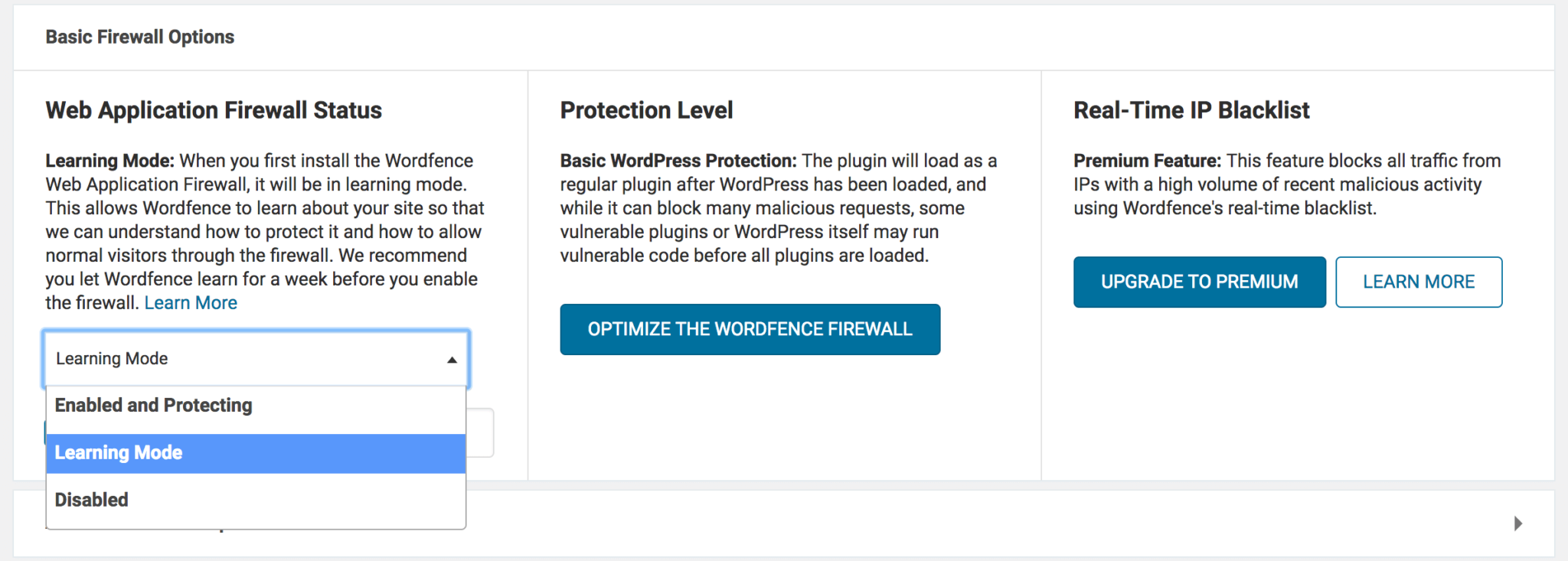
As for server-side WAFs, they usually have similar settings within their own control panels, although they may not always be accessible through WordPress. Regardless of your choice of WAF solution, it should be simple to set up. Once your WAF is in place, your site will be both watertight and adaptable, in case you need to readdress the traffic you’re restricting in the future.
Conclusion
We make no excuses for bringing up site security once again, as it’s such a vital component to any website. If you’re running some kind of business site, security is even more necessary. After all, a lapse involving user data can land you in severely hot water.
Throughout this post, we’ve looked at a front-line defensive tactic that is, unfortunately, a low priority for many website owners. A WAF is a vital tool that can be found in plugins such as Wordfence, but not if you’re looking to fully protect your site. A server-side solution from the likes of Sucuri or Cloudflare is a better solution and can have you protected in minutes with little setup required.
Do you have any questions about how to implement a WAF in WordPress? Share your thoughts in the comments section below!
Featured image: Pexels.