
The ABCs of Blogging

Category: BeginnersCommunity
Author: Bud Kraus
the-abcs-of-blogging-part-1-of-2

This is the first of a two-part post that will help you understand everything you need to know to set up your blog correctly.

It should be no surprise that WordPress, now almost 16 years old, continues to be the world’s most widely used Content Management System. While it has evolved well past its infancy as a writer’s tool, at its core it remains a blogging platform. However, it has been extended in ways no one could’ve imagined.

Just what is blogging anyway?

A blog – or weblog as it was called back in the day – is a simple way to publish articles in chronological order. The original purpose was to let readers easily see the most recent content. Only a few articles would be visible on the site with older content automatically placed into an archive which could be accessed using search and browse methods.

That’s how it still works.

There was even a time when blogging was compared to keeping a journal. In many ways, it’s still that way. Blog content is information that is timely and of import to readers now. While it can still be used for a personal diary, it can be and is used by individuals and businesses for disseminating important, timely information.

In this two-part series, I will demystify what blogs are, how they work, and how you can set one up on your site or make an existing blog better.

Why Should You Learn Blogging?

Maybe you’re thinking as I did, “Who needs to blog? I have nothing to say about myself, my work, or business.”

Really? I don’t believe that.

Even if that were true, understanding the fundamentals of how WordPress blogging works is the key, in almost all cases, to successfully using WordPress. Many plugins that transform WordPress into membership, eCommerce, and social networks sites use blogging concepts to make them work. Plus, I didn’t even mention the countless Custom Post Types that use the blogging model.

Which is why you’ll need to understand blogging even if you’ll never blog.

Besides, blogging is the ideal way to serve up fresh content on your site. And no one loves that more than Google

The Real Basics

WordPress has two very different content types.

  • Pages (also referred to as static content) contain evergreen content.
  • Posts (also referred to as articles) collectively make up the blog.

While pages and posts are created in much the same way and can look very similar, it is the purpose of the content which determines which type is to be used. For information that is permanent and must remain on the site at all times, pages are the way to go. For content that is newsworthy, topical, has a short shelf life, and can be grouped into categories, a blog post is your best bet.

3 Types Of Sites

WordPress can be configured as any one of three types of sites.

A Hybrid Site

The most common WordPress site is set up to present both pages and posts.

My Joy of WP site is a hybrid.

Many of its pages include WordPress training videos, site development services, and information about me. It also has a blog that contains topical information, organized in categories about WordPress.

It’s not necessary to call a blog a “blog” as I have, but it makes it easier for users to identify it as such. If, however, your blog name is “Tips And Tricks” it’s perfectly fine to name it as such.

Pages Only (A Traditional Site)

Not as common as a hybrid site, this type has no blog. This is in line with old HTML sites where static content was exclusively used.

Gallanteditorial.com is a very small site and is representative of a site that has pages but no blog.

Posts Only (A Blog)

This is a site without pages, just blog posts. This is incredibly rare, and so I don’t have any examples for you.

Blog Layouts

There are two parts of every blog. First, there’s an archive page which displays a part of each current post with links to the full post, which is the second part.

The archive page will list, in chronological order, the most recent articles that make up the blog.

A good example of that is the blog on my Joy of WP site. Here’s the archive page which contains key parts of eight posts. Each has a link to its respective and complete article.

An example of an article seen on that archive page is Using Gutenberg Plugins To Extend What Gutenberg Does By Default.

Three Examples

Here are three blog layouts for three very different sites. In each case, it is the theme which is setting every aspect of what information is presented and how that information is styled.
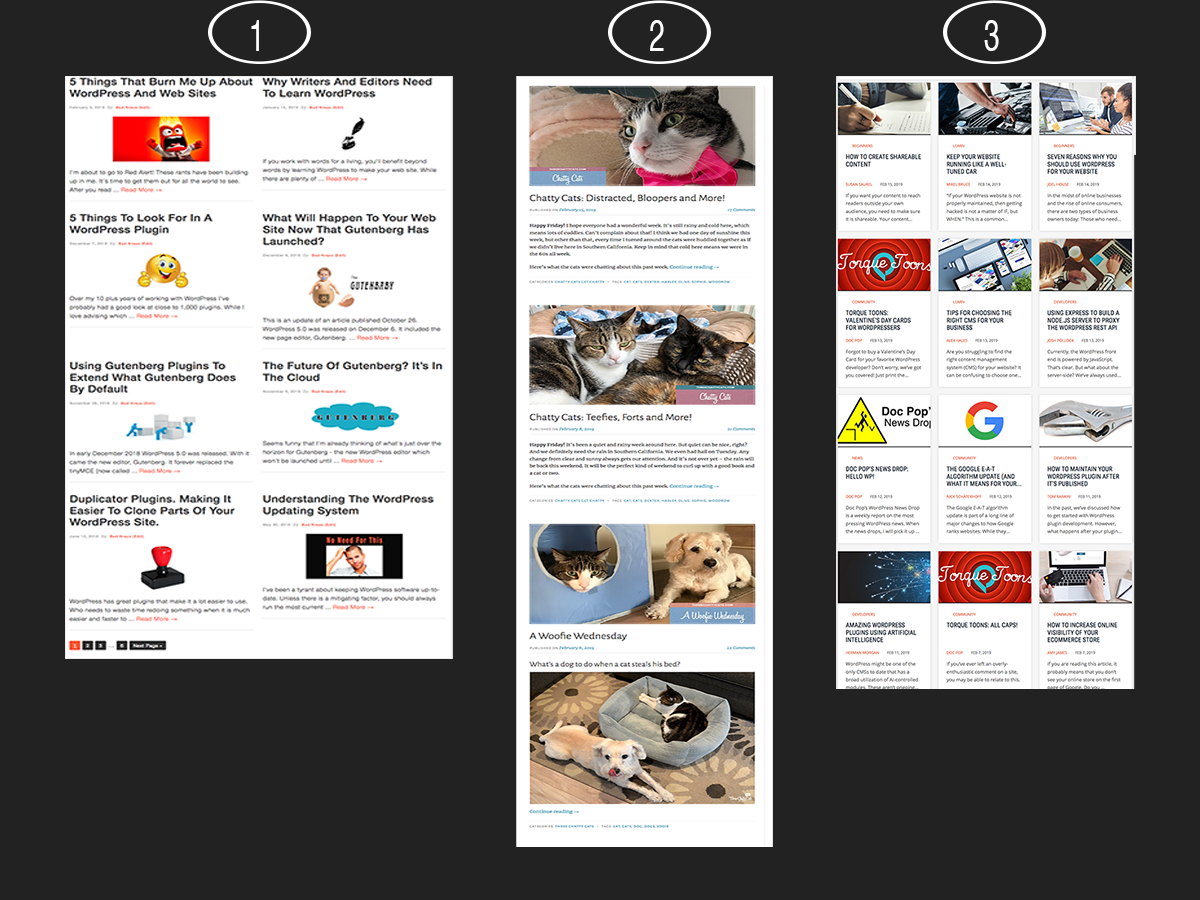
blog type screen shots
  1. A grid layout with 8 posts.
  2. A stacked layout with 4 posts.
  3. A masonry layout with displaying 12 posts. While there are many variations of layouts for archive pages, most will fall into one of those three.

The Common Features

While each theme will present the blog in a different way, you will always find an archive page and its linked articles.

Invariably, you’ll find this content in every blog either in the archive page or the post itself.

    • Title of Article
    • Date Published
    • Date Updated (optional)
    • Author
    • Category and/or Tab
    • Featured Image
    • “Read More” link
    • Article Content
      (copy and media)
    • Reply or Comment box

Other posts

WordPress File Permissions: Everything You Need to Know 

Did you just hear about WordPress file permissions and are wondering if yours are set correctly? Or are receiving an error that you don’t have the right permissions? Either way, this is the right post for you. File permissions are a very important part of protecting your website. They keep your site locked down while giving WordPress itself, its plugins, and other scripts the ability to modify what they need to. But sometimes things can go wrong. Errors may pop up, or file permissions get changed to improper values. In that case, it’s helpful to know how WordPress file permissions […]

Read more

Google’s E-E-A-T Guidelines: How to Show Experience in Content

Google is constantly updating its search algorithms. The E-A-T update made waves some years ago, majorly switching up how things worked to prioritize high-quality content written by experts. Now Google has updated E-A-T again, adding an extra letter: E-E-A-T, or Double E-A-T. The new E stands for “Experience”, as in personal, hands-on experience. While this is likely a change for the better, an algorithm update is always confusing. How can you maintain your SEO status? How do you avoid being penalized under the new rules? What does this change about the way you create content? Knowing what adjustments you need […]

Read more

Press This: Data Liberation

Join the discussion in #data-liberation on Making Slack, or in the Data Liberation GitHub repository.

The Data Liberation project imagines a more open web where users can seamlessly switch between platforms of their choosing, eradicating the concept of being locked into a system and keeping openness at the forefront. Moving to and within WordPress should be a one-click easy process as much as possible whether moving from social networks, moving from a page builder to core blocks, or shifting from the classic editor to the block editor.

As web hosts, agencies, and individual contributors – we can work to make Data Liberation a reality.

Read more

Press This: WordPress and the Future of Journalism

In this episode of Press This, Doc Pop interviews Ryan Singel about the future of WordPress and journalism. They discuss the challenges facing journalism in the digital age, the rise of subscriber-driven newsletters, and the role of platforms like WordPress in empowering independent journalism. Tune in to learn how open-source CMSs like WordPress are shaping the future of journalism.
For more info on DE{CODE} go to https://wpengine.com

Read more

What Are the Next Big Business Opportunities in WordPress?

WordPress is a dominating force in the web development industry offering many opportunities for doing business. Lots of designers, developers, and creators rely on it for income. Continuing to make a living – especially if you’re a freelancer without a steady flow of cash – means knowing where to hone your skills and look for work. Keeping on top of upcoming WordPress trends can help with that. That’s why we’ve taken a close look at where WordPress is headed and identified these ten business trends and opportunities. Keep these in mind as you pursue your WordPress career and perhaps you’ll […]

Read more

Press This: Can AI Make The Web More Accessible?

Can AI make WordPress sites more accessible? In this episode of Press This, we talk with Amber Hinds, CEO of Equalize Digital, about the promises and challenges of using generative AI and LLMs to tackle accessibility issues on the web.

For more info on DE{CODE} go to https://wpengine.com

Read more

Press This: The Business of WordPress

In celebration of DE{CODE} 2024, we talked with Miriam Schwab, Head of WordPress Relations at Elementor, about the evolving landscape of WordPress entrepreneurship. From agency work to startup ventures, Miriam shares insights on building successful businesses with WordPress, ahead of her appearance at DE{CODE} 2024. Discover trends shaping the WordPress business ecosystem and Elementor’s latest innovations.

Read more

17 Best WordPress Beginner Courses: Learn WordPress Now

Mastering WordPress from scratch is tough. It’s a sprawling platform and there’s a lot to learn, including how to properly use the CMS features, build pages with Gutenberg, or extend your website with plugins and code. Beginner training courses for WordPress can help you get started more easily. Unfortunately, there are tons of classes to choose from, and narrowing down the best ones is no easy task. What you need is a curated list of some of the best courses so you can decide from there. And that just happens to be what we have put together here. Below, are […]

Read more

Press This: What Happens at the Intersection of Culture, Creativity, and Tech

In this episode of Press This, we explore the intersection of culture, creativity, and technology with Lawrence Edmondson, founder at Eat Big Digital. Lawrence shares insights on how technology and creativity intersect, shaping cultural shifts over the past decades.

Read more

4 Easy Ways Create a WordPress Sticky Header (+ Best Practices)

You’ve probably seen a sticky header in action before, even on a WordPress site. They follow you as you scroll down the page, making navigating a website quicker and easier. They can even increase engagement by keeping the site menu always a click away. But despite its popularity, this attractive UX design isn’t built into WordPress by default. Headers will usually stay put at the top of the website. So, how can you make your header sticky? There are several different methods, from using WordPress blocks over installing a plugin to using code. Let’s cover a few of the best […]

Read more